BioLife Plasma Services
Takeda PharmaceuticalsMedical
3.912.18K Reviews
- Version
- 3.2.6
- Installs
- 1.00M
- Age Rating
- Everyone
Screenshots
Our Review of BioLife Plasma Services
 Analysis by Appyee
When I’m deciding whether to rely on a medical app, I look beyond the feature list: can I find what I need when I’m in a hurry, and does it help me plan without making assumptions about my health? BioLife Plasma Services is built around the practical side of plasma donation, including appointments and donor records. It is free, developed by Takeda Pharmaceuticals, and has an average rating of 3.9 from around 25,000 ratings. That gives me useful context, but the real question is whether its tools fit your routine and your needs.
Readable screens and a task-focused layout
For a donor who already knows what they want to do, the main appeal is having donation-related tasks gathered in one place instead of switching between calls, a browser and personal calendar notes. Appointments, donation history, eligibility timing, rewards and reminders each answer a different practical question: when can I go, what have I done, and what should I remember next? That organization can reduce small bits of admin, even if it does not remove the donation process itself.
I would treat the app as a planning companion rather than a complete guide to plasma donation. A record or an eligibility date can help you prepare, but it should not replace instructions from the center or a conversation with staff when you have a health concern. This distinction matters most for new donors, who may understandably look for one definitive answer before making a first appointment.
At the time described here, the current version is 3.1.5 and the minimum operating system is version 7.0. It is a medical app rated for Everyone, with over one million installs. Those details make it easy to understand its broad audience, but the usefulness still depends on whether you donate through BioLife and whether the app works comfortably on your own device.
Using it in the context of everyday access
I use this section to consider how the app fits into ordinary routines, especially when someone is balancing appointments with work, transport, or other responsibilities. A useful test is whether its digital steps remain manageable in the place and conditions where you usually check your phone; that leads into the separate question of how tapping, reading, and notifications may feel for different users.
Motor and sensory considerations
The original experience described the navigation as clearly labeled and the overall design as clean rather than crowded. That can help people who prefer a simple path to common tasks, especially when they are checking an appointment or their donation history between other errands. I would still judge readability on the phone you actually use: screen size, text scaling, contrast settings and the way you hold the device can all change how comfortable an interface feels.
If tapping small controls or entering information is difficult, it is sensible to test the basic actions before you depend on the app for an appointment. You can see whether the screens are manageable at your preferred text size and whether the steps feel workable with one hand or with assistive input you already use. I would not assume that a clean-looking layout automatically suits every motor or sensory need.
Access when plans change
The appointment tools are most useful when a donor’s week is not predictable. If a work shift changes, for example, being able to review or adjust a booking on the phone may be easier than finding time to call. Reminders can also serve as a prompt to check the plan before leaving home, rather than relying on memory alone. I would keep a separate calendar entry if missing the appointment would create a serious problem; a notification is helpful, but it is not a guarantee that you will see it.
There is a practical trade-off here: an app can make routine account tasks quicker, but it depends on having a working phone and being comfortable managing those tasks digitally. If you have limited data access, prefer speaking to a person, or need help understanding whether donation is appropriate for you, contacting the center directly is the better route. The app’s support section, with FAQs, troubleshooting tips and a contact option, gives users another place to start when a technical snag gets in the way.
Where it fits—and where it doesn’t
Compared with the usual alternatives of phone calls, a center’s website, or a personal calendar, this app brings scheduling and donor-specific tracking together. That is a meaningful convenience for an established donor who wants to check a next eligible date or keep an eye on rewards without maintaining several separate notes. A calendar can still be better for coordinating donation plans with work, childcare or transport, since it can sit alongside the rest of your commitments.
For someone considering a first donation, I would use the app to organize the practical steps, not as a substitute for deciding whether they are eligible or learning what to expect from staff. For a regular donor who values self-service, the balance is more favorable. Someone who donates elsewhere, rarely uses a smartphone, or needs extensive one-to-one help may get little benefit from installing it.
Small habits that make it more useful
A useful workflow is to check the appointment details before setting out, then add the visit to your regular calendar so it appears beside your other obligations. After a donation, reviewing the history can help you keep your own record straight, while the app’s reminder function can reduce the chance that a planned visit slips your mind. These are modest habits, but together they make the app more dependable as an organizer without asking it to do more than it can.
I would also separate convenience from incentives. Seeing rewards or promotions may be motivating, but I would not let them determine whether donation fits my schedule or personal circumstances. The app can make those details easier to track; it cannot make a donation the right choice for everyone. If a health question or a change in how you feel is part of the decision, ask the center rather than treating an account screen as medical advice.
BioLife Plasma Services has been available since March 25, 2018, and its reception is mixed enough to encourage realistic expectations: there are around 11,000 written reviews alongside its 3.9 average. I would read that as a reminder that an app can be useful for many donors without feeling equally smooth for everyone. If a screen or workflow is confusing, the built-in support options are worth trying, and a direct conversation may be more efficient for questions that are not simply about using the app.
For access needs, I would make the decision based on a short real-world test: can you sign in, locate an appointment, and read the information comfortably in the conditions where you normally use your phone? Try it seated, in good light, and, if relevant, with your usual accessibility settings enabled. If those basics are hard, do not force the app into your routine; the phone or website route may be less frustrating, and staff can help with center-specific questions.
That is also why I would avoid describing it as universally accessible. Clear labels and a relatively uncluttered presentation are positive signs, but they do not answer every question about visual, motor, cognitive or sensory comfort. The app is best judged as one option in a broader service experience, with in-person support remaining important when digital steps are not enough.
Hey there! So, I recently got the chance to dive into the BioLife Plasma Services app, and let me tell you, it’s quite the handy tool if you're into the whole plasma donation thing. Whether you’re a seasoned donor or just thinking about starting, this app has got you covered in so many ways.
First Impressions
Okay, first things first. Downloading the app was a breeze. It’s available on both Android and iOS, so no worries about compatibility. Once installed, the setup process was straightforward. You just need to create an account or log in if you already have one. The design is clean and user-friendly, which is always a plus in my book. It doesn't bombard you with too much info at once—it's simply intuitive.
Features That Stand Out
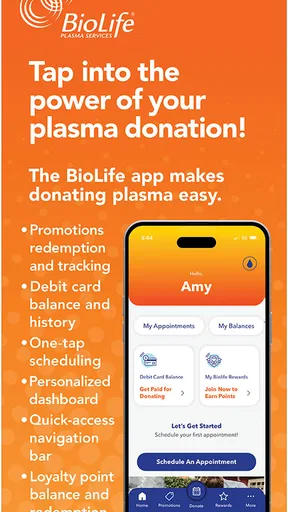
Now, let’s talk features. The app is packed with everything you need to manage your plasma donations efficiently. Here are some of the highlights:
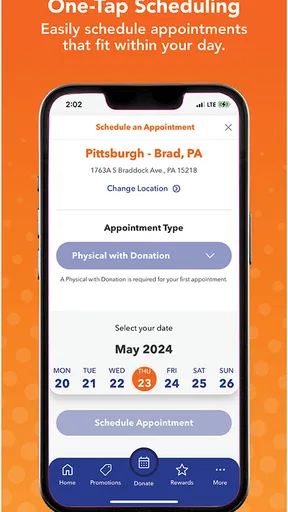
- Scheduling Appointments: This is probably the biggest draw. You can book, reschedule, or cancel appointments right from your phone. No more waiting on hold or dealing with clunky websites.
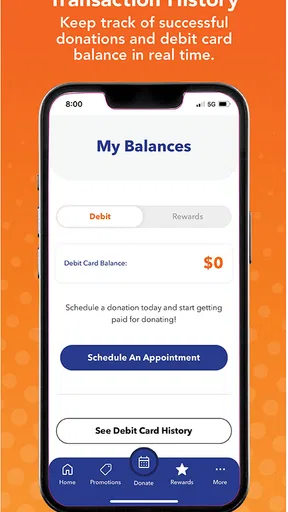
- Donation Tracker: The app keeps a neat record of all your donations. You can see when you last donated, how much you’ve donated, and your next eligible date. It's like having a personal donation diary.
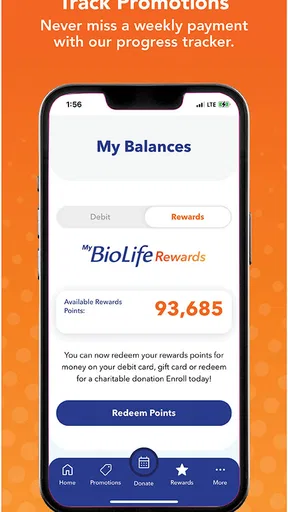
- Rewards and Promotions: Who doesn’t love rewards? The app lets you track your rewards points and see current promotions. It’s a little extra motivation to keep donating.
- Notifications and Reminders: Life gets busy, right? The app sends you reminders for upcoming appointments, so you’re less likely to forget.
User Experience
Using the app is super smooth. The tabs and options are clearly labeled, so navigating through them is a piece of cake. The color scheme is easy on the eyes, and the overall design feels modern. It’s clear the developers put a lot of thought into making this app as user-friendly as possible.
One thing I really appreciated is the support section. They’ve included a bunch of FAQs and troubleshooting tips, which is super helpful if you run into any issues. Plus, there’s a contact option if you need to reach out for more personalized help.
Why It Matters
Now, you might be wondering why you’d even need an app for plasma donations. Well, if you’re a regular donor, this app is a game-changer. It’s all about convenience. You can manage your entire donation schedule without having to make calls or visit the center’s website. Plus, keeping track of rewards and donations is a nice perk. The app really makes the whole process feel more rewarding and less of a chore.
For first-timers, the app is a great introduction to the world of plasma donation. It provides all the info you need to get started and keeps you informed about your donation eligibility and rewards. It’s a great way to ease into the donation process.
The Final Scoop
So, is the app worth the download? Absolutely! Whether you’re a regular donor or just curious about starting, this app simplifies everything. It’s efficient, user-friendly, and packed with features that make the whole donation process easier and more engaging.
Give it a try, especially if you’re looking to streamline your donation schedule and maximize your rewards. It’s like having a personal assistant for your plasma donations right in your pocket. And honestly, who wouldn’t want that?
Privacy and Permissions
See what permissions an app requests and how it handles your data.
- Calendar
- read calendar events plus confidential information, add or modify calendar events and send email to guests without owners' knowledge
- Location
- approximate location (network-based)
- Camera
- take pictures and videos
- Other
- view network connections, expand/collapse status bar, full network access, run at startup, draw over other apps, control vibration, prevent device from sleeping, read Google service configuration
Verdict
Strengths of BioLife Plasma Services
- User-friendly interface for easy navigation.
- Efficient appointment scheduling feature.
- Real-time updates on donation status.
- Reward system for frequent donors.
- Comprehensive donor eligibility info.
Limitations of BioLife Plasma Services
- Limited language options available.
- Requires stable internet connection.
- Occasional app crashes reported.
- No offline access to donation history.
- Some users find notifications intrusive.
Similar Picks in This Category
View All
WebMD: Symptom Checker
WebMD, LLC4.1

Microphone Amplifier
DOSA Apps4.2

Anatomy Learning - 3D Anatomy
3D Medical OU4.5

Period Tracker and Calendar
SimpleInnovation4.9

GoodRx: Prescription Coupons
GoodRx4.8

CVS Health
CVS Pharmacy4.5
Frequently Asked Questions
What is BioLife Plasma Services and what does the app do?
BioLife Plasma Services is a platform that facilitates the donation of plasma, which is crucial for developing therapies for patients with chronic conditions. The app allows users to locate donation centers, schedule appointments, and track their donation history. It also provides information on eligibility requirements and any available promotions.
How do I schedule a plasma donation appointment through the app?
To schedule a donation, first create an account or log in. Navigate to the ‘Appointments’ section, select your nearest donation center, and choose a suitable date and time from the available slots. The app provides reminders and allows easy rescheduling if needed. It’s designed to streamline the donation process for users.
Are there any eligibility requirements for donating plasma?
Yes, donors must meet specific eligibility criteria to ensure safety. Generally, donors should be in good health, weigh at least 110 pounds, and be between 18 and 69 years old. The app provides detailed guidelines on health conditions, medications, and lifestyle factors that may affect eligibility. It’s crucial to review these before scheduling your appointment.
What safety measures are in place during plasma donation?
BioLife Plasma Services prioritizes donor safety with rigorous protocols. Each donation is conducted in a sterile environment with trained professionals. The app offers detailed information about the safety measures, such as sanitization practices, use of personal protective equipment, and health screenings. It's important to follow all guidelines provided to ensure a safe donation experience.
Are there any rewards or compensation for donating plasma?
Yes, donors are often compensated for their time and effort. The app details current promotions and compensation rates, which may vary by location. Some centers offer loyalty programs or bonuses for frequent donations. Check the app regularly for updates on rewards and ensure your profile is complete to access these benefits.
